The Free ATS
built by recruiters, for recruiters
Job posts, a career page with your brand, and pipelines you share with your client. The whole hiring process in one ATS, free.
Free to use · Public and private job posts · Automatic Google Jobs publishing · Fully customisable pipeline stages
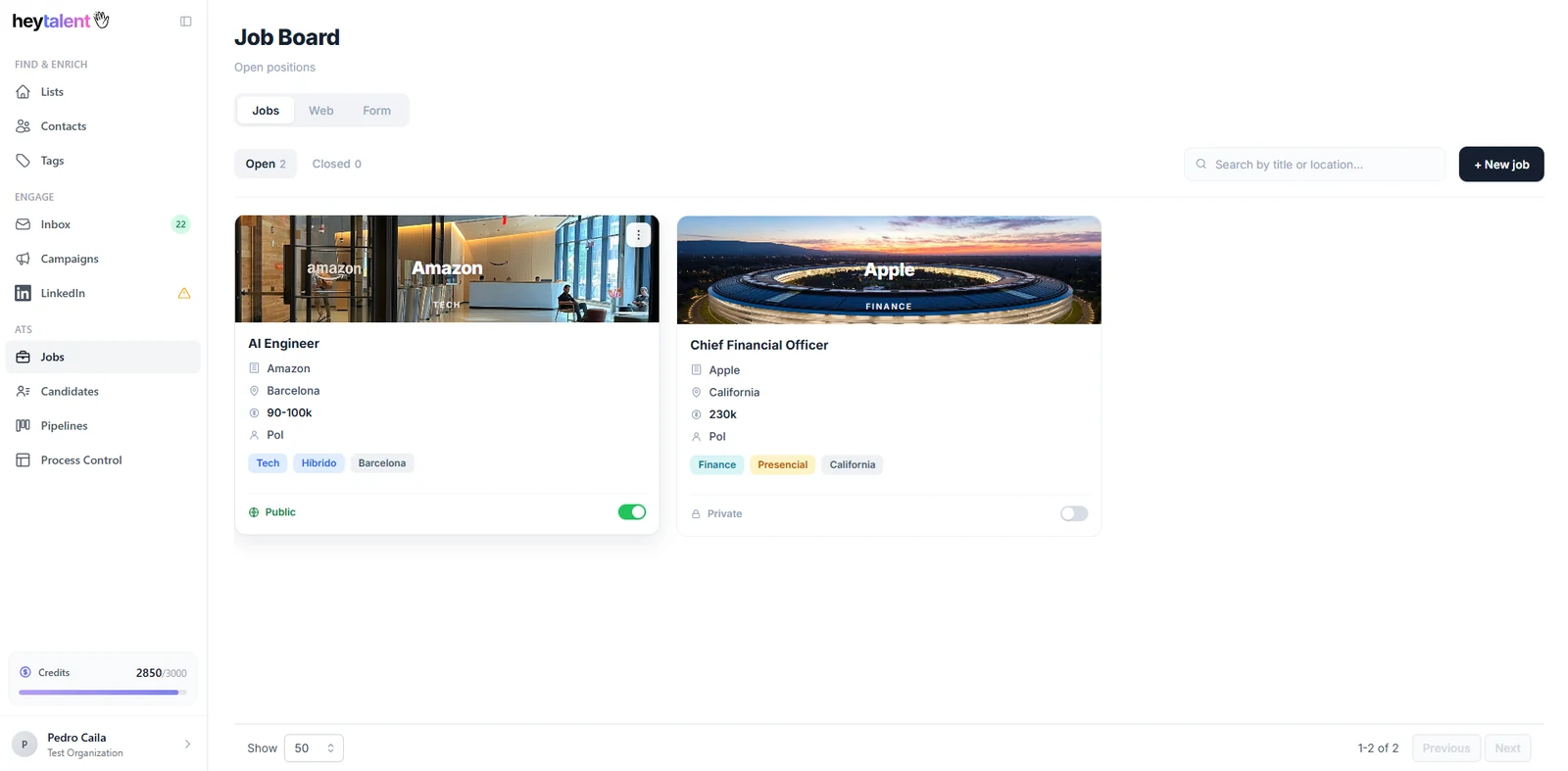
Job posts
Public posts on your career page and private posts that live behind a link and stay out of Google.
Career page
Your logo, your colours, your domain feel. Every public job post lands there and on Google Jobs automatically.
Candidates
Every applicant in one place, filterable, plus manual upload for the candidates you already had.
Pipelines
One pipeline per job with the stages you decide, shareable with your client stage by stage.
One free applicant tracking system for the whole process: attract, receive, organise, decide.
Free, and not the kind of free with an asterisk
The whole applicant tracking system, at no cost. Here is why that is not a trick.
Most free ATS options are a trial that expires, a plan capped at one open job, or a product that is free until you try to invite a colleague. This is none of those. Job posts, career page, application forms, candidate database, pipelines, client sharing and process control: all of it, free.
The full ATS
- Job posts, career page, forms, candidates, pipelines, client sharing and process control
- Public job posts published to Google Jobs at no cost
- Not a trial that expires into a paywall
- The paid plans cover sourcing, not the ATS
We migrate your candidates for you
Changing ATS usually means leaving years of candidate history behind in the old tool. If you are on a HeyTalent sourcing plan, we help you bring your existing candidates across.
- Your candidates moved into the HeyTalent ATS
- You start with your database, not an empty one
- No extra cost on top of your sourcing plan
It can be free because the ATS is not what HeyTalent sells. The paid plans cover sourcing: finding up-to-date profiles, filtering them with AI, verified contact data and LinkedIn outreach. The ATS is the other half of a recruiter's day, and giving it away is how we get to be in it.
Public job posts, private job posts, and Google Jobs included
Two kinds of job post because recruitment has two kinds of search: the one you want everyone to see, and the one you do not.
Creating a job post in HeyTalent takes one form. You write the role, decide the visibility and publish. A public job post goes live on your career page and is submitted to Google Jobs automatically, with no plugin, no XML feed to maintain and no separate job board account. Google Jobs is where a large share of job searches now start, so being there is not an optional extra, it is table stakes for organic applications.
A private job post behaves the opposite way on purpose. It never appears on your career page, it carries a noindex directive so search engines leave it alone, and it is reachable only through the link you share. It is the format for a confidential replacement, an executive search you cannot advertise, a role a client wants kept quiet, or a shortlist you want to send to a specific group of candidates. Same pipeline, same forms, same tracking, just not in public.
- Public job posts published on your career page in one click
- Automatic Google Jobs publishing for every public post
- Private job posts accessible by link only, never indexed
- Every job post generates its own pipeline automatically
- Open, paused and closed states so old posts stop taking applications
Public vs private job posts
Same ATS, two visibility models.
| Public job post | Private job post | |
|---|---|---|
| On your career page | Yes | No |
| Google Jobs | Published automatically | Not submitted |
| Indexed by Google | Yes | No, noindex |
| Access | Anyone who finds it | Only who has the link |
| Pipeline generated | Yes | Yes |
| Custom application form | Yes | Yes |
A career page that looks like you, not like your software
Every public job post needs somewhere to live. Yours carries your brand, not a vendor logo.
HeyTalent gives you a career page as part of the ATS, and it is customisable with your own brand: your logo, your colours, your tone. Candidates who click through from Google Jobs, from LinkedIn, or from a link in your email signature land on a page that looks like a continuation of your company, not a detour into a generic job board.
The page stays in sync with your job list on its own. Publish a public role and it appears; close it and it disappears. There is no second place to update and no risk of a candidate applying to a role you filled three weeks ago. For agencies running employer branding on behalf of clients, this is the difference between a professional first impression and a broken link.
- Your logo, colours and brand identity on every page
- Public job posts appear and disappear automatically
- Built to be the landing page for Google Jobs and LinkedIn traffic
- One page for all your open roles, shareable as a single link

Ask exactly what you need to ask
A customisable application form per job post, because screening starts before the first call.
The application form attached to each job post is customisable. Ask for the CV and nothing else when you want maximum volume, or add the qualifying questions that let you filter properly when the role is specific: years of experience with a given stack, work permit status, language level, salary expectations, notice period, availability to relocate.
Every answer travels with the candidate into the pipeline, so filtering later is filtering on real data rather than on a hunch. A well-built form is the cheapest screening you will ever do, and it means the first conversation you have with a candidate is already a useful one.
- Custom fields and questions per job post
- CV upload attached to the candidate record
- Answers stored with the candidate and filterable afterwards
- Same form builder for public and private job posts
Every candidate in one place, filterable
Applications from your job posts and the candidates you already had, in a single database.
The candidates section is where everyone who applied to any of your job posts lives. You can view the full list, open any profile, read the answers they gave in the application form and download their CV. Filters let you cut the list down to the people you actually want to look at right now instead of scrolling through everything.
You can also upload new candidates yourself. That matters more than it sounds: most recruitment teams already have candidates worth re-contacting, sitting in a folder, an old spreadsheet or someone's inbox. Uploading them puts them in the same database as your inbound applications, so the next time you open a similar process you are not starting from zero.
- All applicants across all job posts in one list
- Filter down to the profiles that match the role
- Upload candidates manually to build your own database
- CV and application answers on every candidate record
One pipeline per job, with the stages you decide
Applications land in the pipeline on their own. You move them forward.
Every job post you create generates its own pipeline, and the stages of that pipeline are entirely up to you. Screening, phone interview, technical test, client interview, offer, hired: name them how your process actually works, add the ones you need, remove the ones you do not. A tech role and an operations role rarely have the same steps, so they should not be forced into the same template.
Candidates who apply drop directly into the pipeline of that job post, with no manual import step in between. From there you move them between stages as the process advances, and the pipeline becomes the live picture of where everyone stands. When someone asks how the process is going, the answer is a screen, not a reconstruction from memory.
- A pipeline created automatically with every job post
- Fully customisable stages, per process
- Applicants land in the pipeline with no manual import
- Move candidates between stages as the process advances
Share the pipeline with your client, stage by stage
They see the candidates and the CVs. You decide which stages they see.
If you recruit for clients, the reporting is half the job. HeyTalent lets you share a pipeline directly with your client so they can review the candidates and open their CVs themselves, without you attaching files to an email thread that nobody can find two weeks later.
The important part is that sharing is selective: you choose which stages of the pipeline are visible. Keep your screening and your rejected candidates to yourself and share only the shortlist stage, or open up the interview stages so the client can follow the process closely. Different clients want different levels of visibility, and the setting is per pipeline, so you are not locked into one policy for everyone.
- Share a pipeline with your client in a few clicks
- Pick exactly which stages are visible to them
- Clients review candidates and open their CVs directly
- No more forwarding CVs by email or chasing feedback in chat
The internal view of every process you have open
Priorities, notes and time to close, for the team rather than the client.
Process control is the internal side of the ATS. It is where a recruitment team looks at every open process at once: which ones are a priority, who is on them, what happened last, and how long each one has been running. It is deliberately separate from what the client sees, because the conversation a team has internally is not the conversation it has with a client.
You can prioritise processes so the team knows what to work on first, leave notes so context does not live in one person's head, and see the time a process is taking to close. That last number is the one that changes behaviour: a process that has been open for weeks with no movement is a problem you want to see on a screen, not discover in a quarterly review.
- All open processes in a single internal view
- Prioritise so the team knows where to push
- Notes per process, shared across the team
- Time to close tracked on every process
From job post to hire in four steps
The whole flow, with nothing to wire up in between.
- Step 1
Create the job post
Write the role, build its application form and choose the visibility: public on your career page and Google Jobs, or private behind a link that search engines never index.
- Step 2
Receive applications
Candidates apply from your branded career page or from the private link. Their answers and CVs arrive attached to their candidate record, ready to filter.
- Step 3
Run the pipeline
Applicants land in the pipeline generated by the job post. Move them through the stages you defined and add candidates from your own database when you need to.
- Step 4
Share and close
Share the stages you choose with your client so they can review candidates and CVs, track the process internally with priorities and notes, and close it.
Built for teams that run several processes at once
Agencies, headhunters and in-house teams use the same ATS in different shapes.
The HeyTalent ATS was designed by recruiters, which mostly shows up in what it does not force you to do. There is no rigid stage template, no requirement to make every role public, no assumption that the only person who needs to see a candidate is you, and no bill at the end of the month. Here is how different teams use it.
Recruitment agencies
One pipeline per client role, shared selectively with each client, plus internal process control across the whole portfolio.
Executive search
Private job posts for confidential mandates, with everything traceable but nothing public.
In-house talent teams
A branded career page, automatic Google Jobs publishing and pipelines shared with the hiring manager.
RPO and freelancers
Run several clients at once without mixing processes, and give each one their own view of their pipeline.
An ATS is half the job. The other half is finding people.
The free ATS handles the candidates who come to you. HeyTalent also handles the ones who do not.
Inbound applications only take you so far. Most senior and technical roles are filled by going out and finding people who were not looking, which is what the rest of the HeyTalent platform is for: sourcing profiles with AI filters, finding verified contact details, and running the outreach that turns a profile into a conversation. This is the part that is paid, and it is what lets the ATS be free.
Using both sides together means a sourced candidate and an inbound applicant end up in the same pipeline, under the same process, with the same visibility for your client. One tool, one process, whichever direction the candidate came from.
What is an ATS and what should it actually do?
A short, honest definition before the feature tour.
An applicant tracking system, or ATS, is the software a recruitment team uses to publish job posts, collect applications and move candidates through a hiring process until someone is hired. That is the textbook definition. In practice, most teams end up with an inbox full of CVs, a spreadsheet with candidate names, and a WhatsApp thread where the client asks how the process is going. The ATS is supposed to replace all three.
The HeyTalent ATS is free, and it is built around the way agencies, headhunters and in-house talent teams actually run a process. You create a job post and decide whether it is public, published on your career page and pushed to Google Jobs, or private, reachable only by the people you send the link to and never indexed by search engines. The moment the post is live, it generates its own pipeline with the stages you defined, and every application drops straight into it. No copy and paste, no re-typing names into a spreadsheet.
From there the work is the work: filter candidates, move them between stages, upload the profiles you already had in your own files, leave notes on the process, and share the pipeline with your client so they can review candidates and open their CVs without you forwarding a single email. Everything a recruitment process needs to be traceable is in one place, which is the whole point of an applicant tracking system in the first place.
ATS questions we get most often
Job posts, Google Jobs, pipelines, client access and everything in between.
See the free ATS running on a real process
Book a 20-minute demo or talk to sales and we will show you the whole flow, from job post to shared pipeline.
The HeyTalent ATS covers the part of recruitment that usually lives in a spreadsheet: public and private job posts, a career page with your brand, automatic Google Jobs publishing, customisable application forms, a filterable candidate database, pipelines with your own stages, selective client sharing and internal process control. All of it free. Tell us how your processes run today and we will show you what they look like inside HeyTalent.